
Introducing the Latest FantasyLabs NFL Season-Long, Best Ball, and Survivor Tools

We have introduced a collection of updates to its NFL season-long tools, giving fantasy football players more support for Best Ball drafts, traditional season-long leagues, and survivor pools. The additions include live draft integration with Yahoo and Sleeper, AI-powered pick recommendations, tiered rankings, stack analysis, expanded player blurbs, and upgraded survivor tools.


Together, the new features are designed to make important information easier to find and act on, whether users are preparing before a draft, making decisions while on the clock or managing survivor entries throughout the season.

Follow Yahoo and Sleeper Drafts Live and Draft Companion
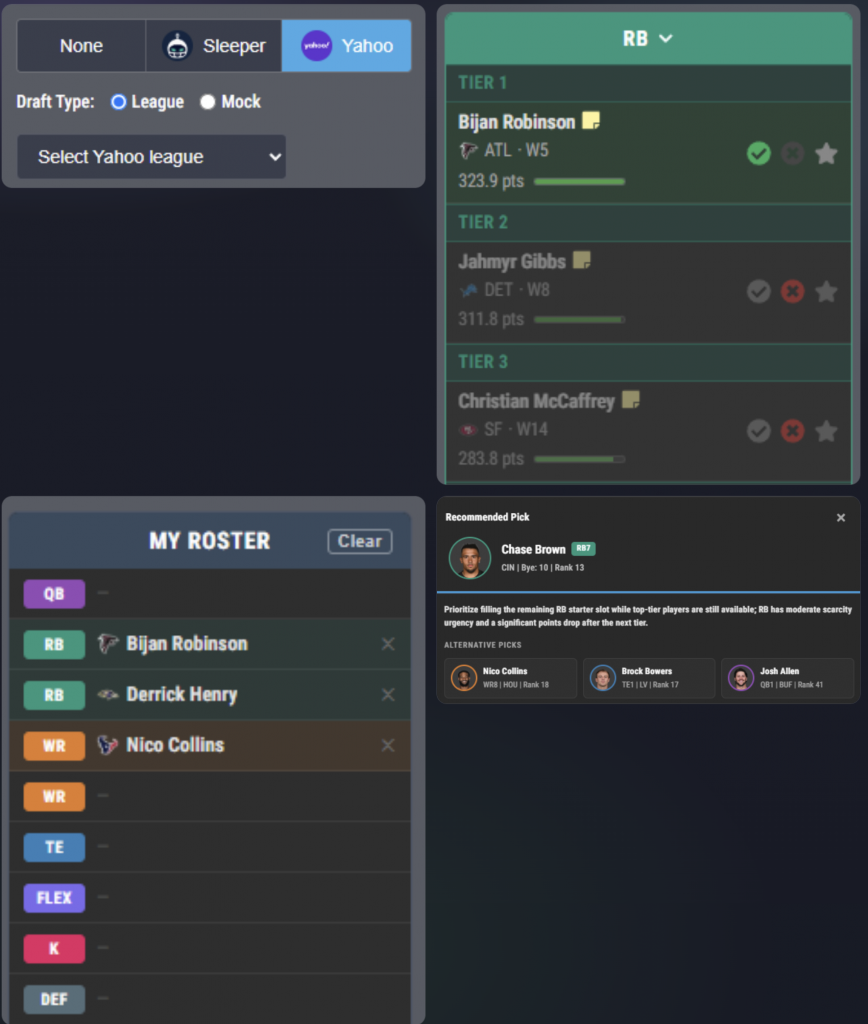

The new Live Draft Cheat Sheet integration connects a custom cheat sheet to live drafts on Yahoo and Sleeper. Users can select their platform and enter the league or mock draft information, including the league ID found in the draft lobby or URL.

Once connected, the draft board follows the room in real time. Selected players are automatically removed from the cheat sheet, the picks feed updates as each selection is made, and users can monitor their developing roster without manually recreating the draft in a second tool.

The integration also unlocks DraftLabs Agent Mode, which supplies AI-powered recommendations while the user is on the clock. Suggested picks account for projected points, league settings, positional scarcity, tier cliffs, and the settings applied to the user’s custom cheat sheet.
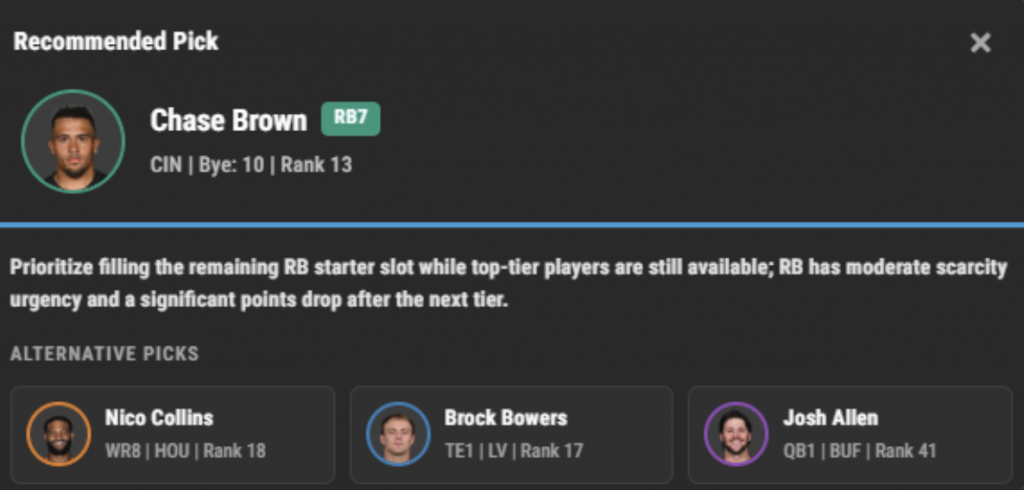

Custom cheat sheets can now be switched into Draft Mode, creating a streamlined second-screen companion for live drafts. Players are organized in tiers to make comparisons faster, while simple controls allow users to mark a player as drafted, hide an option, or add a player to their favorites as the board changes.

This format is especially useful for in-person drafts that do not offer a direct platform connection. Instead of managing a paper list or constantly updating a spreadsheet, users can keep their rankings and draft tracking together in one view.

Compare Players With Position-Based Tiers
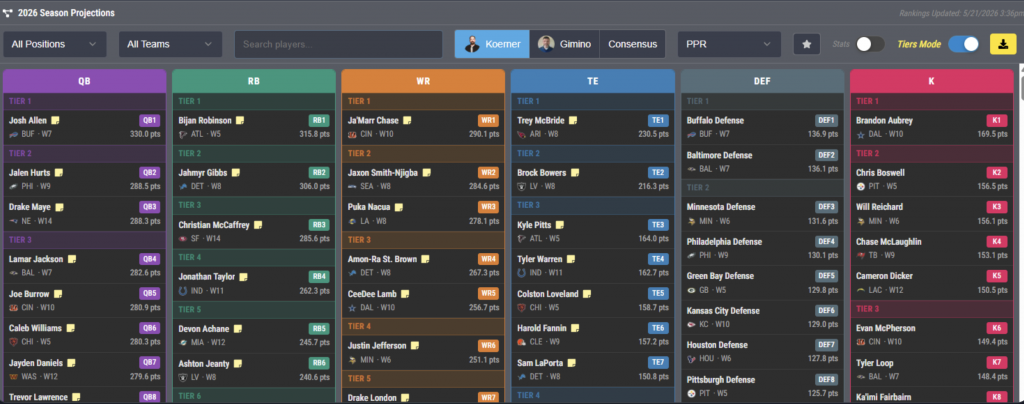

The new Season Projections Tiers Mode organizes rankings by position and divides players into tiers. The position-first layout makes the player pool easier to scan and highlights where meaningful value gaps exist within a position.

Tiering can help users identify when several comparable options remain and when a sharp drop-off may be approaching. It also pairs with our player blurbs, allowing users to add quick qualitative context to the projections and rankings.

Find Correlated Picks With Best Ball Stacks Mode
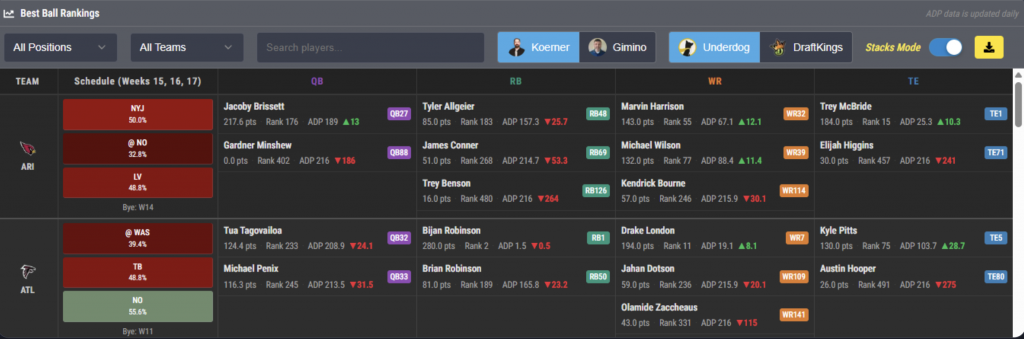

Best Ball Stacks Mode brings team-stacking information into a dedicated display. Users can quickly identify teammates who can be paired in correlated builds while also seeing playoff-opponent context that may affect late-season strategy.

The mode includes current average draft position data for DraftKings and Underdog. Combining stack options, playoff matchups, and platform-specific ADP in one place can help users evaluate both the potential upside and the acquisition cost of a Best Ball combination.

Access Actionable Blurbs for More Than 250 Players
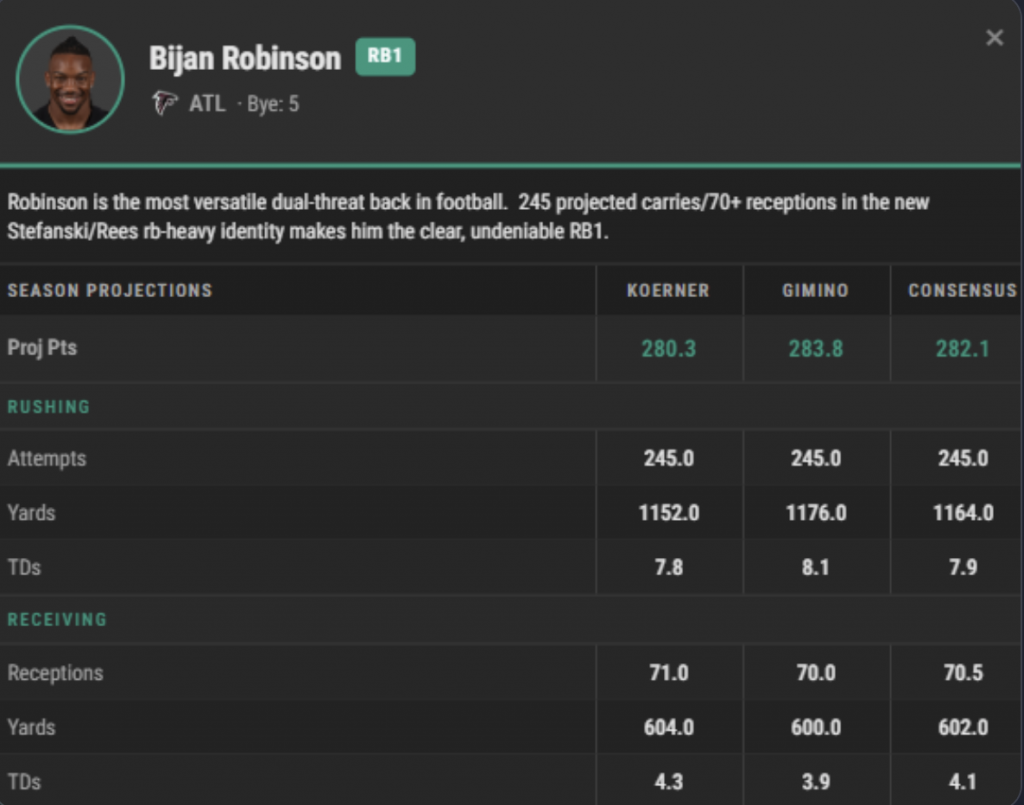

We have added concise write-ups for more than 250 players. These blurbs are available within Season Projections Tiers Mode and Cheat Sheet Draft Mode, providing fast context without forcing users to leave the draft workflow.

The notes are intended to complement the numerical projections and tier structure. Users can review a player’s outlook or relevant considerations with minimal navigation before making a decision.

Manage Multiple Survivor Entries
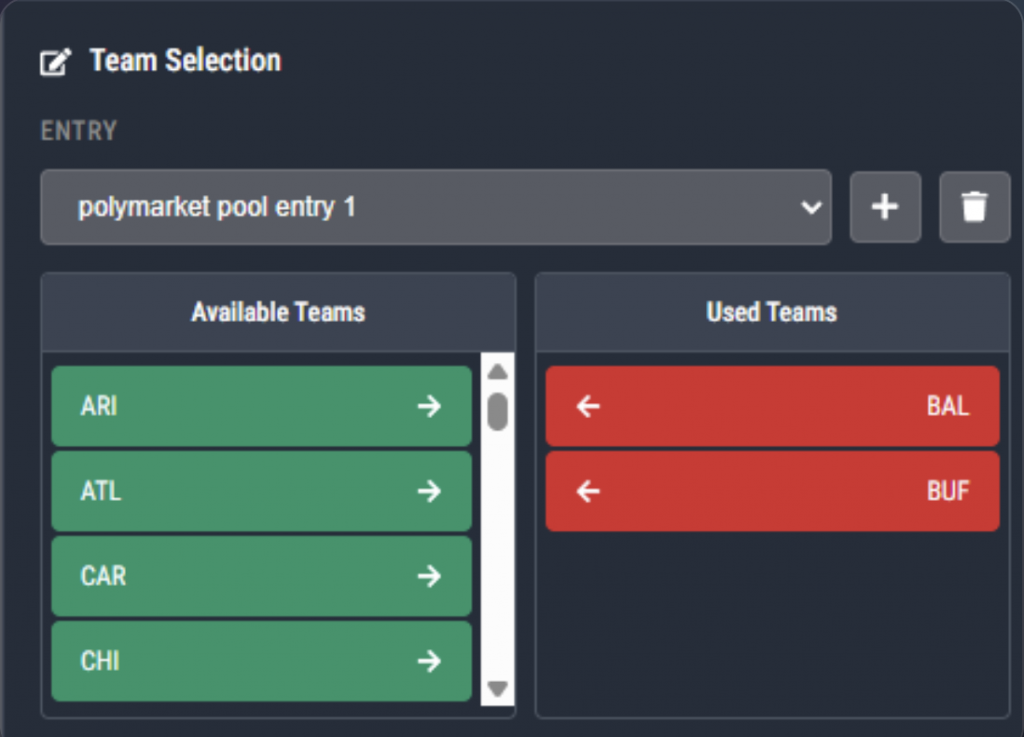

The enhanced survivor analysis tools now support multiple entries from a single account. Users can create and name separate entries, such as entries for different leagues or pools, and move between them with a dropdown menu.

Each entry maintains its own list of used teams. Available and used-team panels update when a pick is made, and progress is automatically saved to the user’s account so it remains available across sessions and devices.

The active entry also carries through the broader survivor analysis experience. The leverage table, season schedule grid, and option to hide used teams all adjust to the selected entry, helping users avoid mixing information between pools.

Additional survivor upgrades provide more detail on opponent and matchup strength, along with estimated pick percentages and leverage analysis. Those tools can help users weigh a team’s chances of advancing against its expected popularity, an important consideration when trying to separate from the field in larger pools.

We have introduced a collection of updates to its NFL season-long tools, giving fantasy football players more support for Best Ball drafts, traditional season-long leagues, and survivor pools. The additions include live draft integration with Yahoo and Sleeper, AI-powered pick recommendations, tiered rankings, stack analysis, expanded player blurbs, and upgraded survivor tools.


Together, the new features are designed to make important information easier to find and act on, whether users are preparing before a draft, making decisions while on the clock or managing survivor entries throughout the season.

Follow Yahoo and Sleeper Drafts Live and Draft Companion


The new Live Draft Cheat Sheet integration connects a custom cheat sheet to live drafts on Yahoo and Sleeper. Users can select their platform and enter the league or mock draft information, including the league ID found in the draft lobby or URL.

Once connected, the draft board follows the room in real time. Selected players are automatically removed from the cheat sheet, the picks feed updates as each selection is made, and users can monitor their developing roster without manually recreating the draft in a second tool.

The integration also unlocks DraftLabs Agent Mode, which supplies AI-powered recommendations while the user is on the clock. Suggested picks account for projected points, league settings, positional scarcity, tier cliffs, and the settings applied to the user’s custom cheat sheet.


Custom cheat sheets can now be switched into Draft Mode, creating a streamlined second-screen companion for live drafts. Players are organized in tiers to make comparisons faster, while simple controls allow users to mark a player as drafted, hide an option, or add a player to their favorites as the board changes.

This format is especially useful for in-person drafts that do not offer a direct platform connection. Instead of managing a paper list or constantly updating a spreadsheet, users can keep their rankings and draft tracking together in one view.

Compare Players With Position-Based Tiers


The new Season Projections Tiers Mode organizes rankings by position and divides players into tiers. The position-first layout makes the player pool easier to scan and highlights where meaningful value gaps exist within a position.

Tiering can help users identify when several comparable options remain and when a sharp drop-off may be approaching. It also pairs with our player blurbs, allowing users to add quick qualitative context to the projections and rankings.

Find Correlated Picks With Best Ball Stacks Mode


Best Ball Stacks Mode brings team-stacking information into a dedicated display. Users can quickly identify teammates who can be paired in correlated builds while also seeing playoff-opponent context that may affect late-season strategy.

The mode includes current average draft position data for DraftKings and Underdog. Combining stack options, playoff matchups, and platform-specific ADP in one place can help users evaluate both the potential upside and the acquisition cost of a Best Ball combination.

Access Actionable Blurbs for More Than 250 Players


We have added concise write-ups for more than 250 players. These blurbs are available within Season Projections Tiers Mode and Cheat Sheet Draft Mode, providing fast context without forcing users to leave the draft workflow.

The notes are intended to complement the numerical projections and tier structure. Users can review a player’s outlook or relevant considerations with minimal navigation before making a decision.

Manage Multiple Survivor Entries


The enhanced survivor analysis tools now support multiple entries from a single account. Users can create and name separate entries, such as entries for different leagues or pools, and move between them with a dropdown menu.

Each entry maintains its own list of used teams. Available and used-team panels update when a pick is made, and progress is automatically saved to the user’s account so it remains available across sessions and devices.

The active entry also carries through the broader survivor analysis experience. The leverage table, season schedule grid, and option to hide used teams all adjust to the selected entry, helping users avoid mixing information between pools.

Additional survivor upgrades provide more detail on opponent and matchup strength, along with estimated pick percentages and leverage analysis. Those tools can help users weigh a team’s chances of advancing against its expected popularity, an important consideration when trying to separate from the field in larger pools.

About the Author

The FantasyLabs staff is dedicated to bringing you the best DFS news, resources, and tools.